How to setup HyperLiquid / MT5 Arbitrage Trading Bot
Updated: Jul 19
In this tutorial, you're going to learn how to setup a fully automated arbitrage trading strategy between HyperLiquid and MT5. As part of this tutorial, you will also gain access to my Arbitrage Trading Dashboard.
Live Strategy Performance: https://hl-arbitrage-public.atjresearch.com/

How to Strategy makes money
An arbitrage strategy makes money by buying and asset that's cheaper on one exchange and selling an asset that's more expensive on another exchange. When the price discrepancies even out over time, you can close both positions in a net profit.
Additionally, another edge of the strategy is the Funding Rate Arbitrage due to how funding rate mechanisms work on HyperLiquid. When prices on HyperLiquid move away from the real market price, the funding rates will favor the direction of our arbitrage strategy.
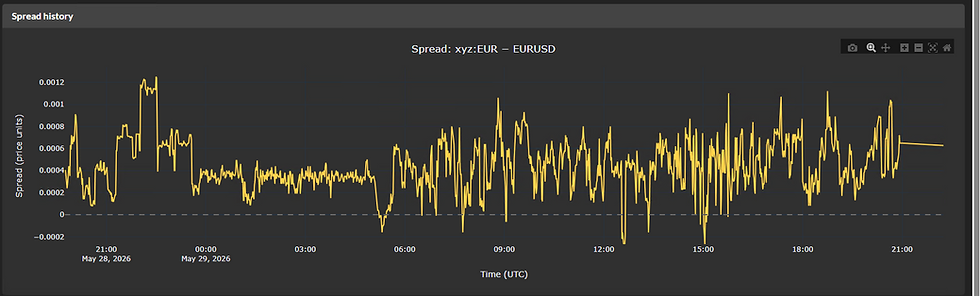
In the chart below, you can see the cross-exchange spread (price difference between exchanges) on EURUSD. As you can see, the differences are quite significant, which indicates that the symbol is viable for arbitrage trading.
In the following section, you will learn how to setup the fully automated arbitrage strategy on your own computer/VPS.
Disclaimer
Content provided by ATJ Research does not serve as investment advice but serves for educational purposes only. Your capital is at risk when trading in the financial markets. Past performance is not an indicator of future results. The use of ATJ Research's content or 3rd party investment services is solely at your own discretion and responsibility. The content may contain affiliate links.
Additional note from Author
This file contains automated trading code, shared as a personal project I built with the help of AI. Please understand that algorithmic trading is risky and you could lose money.
The code is provided "as is," with no warranty of any kind. It likely contains bugs and errors, so please study and test it carefully before risking any real money.
I am not responsible for any losses or damages resulting from the use of this code.
Setup Guide Video
Requirements
Below you will find a list of items, that you will need to run your arbitrage trading strategy.
HyperLiquid Trading Account - Obviously, you need to create a trading account on the HyperLiquid Exchange. Sign-up link with a 4% discount on trading commissions: https://app.hyperliquid.xyz/join/ATJTRADER Once your account is created, you will need to fund it with USDC. Please be careful to use the correct network when you send USDC!
MT5 Trading Account - We are going to hedge our HyperLiquid exposure with MT5. Currently, I use IC Trading as my CFD Broker. MT5 LINK: https://www.ictrading.com?camp=79336
You need to request the NETTING account type from their customer support chat. NETTING account types aggregate your positions into a single net exposure which makes it easier to manage your trades on MT5. You can send a request with this message: "I want to create an MT5 NETTING account, Type RAW SPREAD, Currency USD, Leverage 1:30" MT5 Account Specs:
Platform - MT5
Account Type - Raw Spread NETTING
Currency - USD
Leverage - 1:30 (You can always increase if required)
VPS (optional) - A VPS stand for Virtual Private Server. It is a machine that runs remotely 24/7. This means that you don't need to have your own PC running all the time. For testing the trading strategy, you can use your own PC but once you have a strategy ready and tested, I recommend deploying it on a VPS. If you are just starting out, it's ok to use the the cheapest VPS, which is their "Core" plan. You can always upgrade later based on the performance of your server. Important! IC TRADING offers free VPS for clients who reach sufficient volume. You can check out their conditions to meet the free VPS requirements in their client area. Currently, there are some HyperLiquid geo-restrictions in the US and GB. Therefore, I don't recommend setting up a VPS in those locations.
VPS LINK: https://www.forexvps.net/?aff=95338 VPS Specs:
ForexVPS Core plan
2x Cores / 4GB RAM / 100GB SSD
OS - Windows
Server Location - Germany, Singapore or Tokyo
Download Trading Bot and Dashboard - You will need to download Python scripts from my website. For this, you will need an active Membership subscription at ATJ Research. Subscribe to Membership: https://www.atjresearch.com/pricing-plans/list Once you are subscribed, you can download the files here: DOWNLOAD LINK Proceed with the installation steps inside README.md of the downloaded project.
Need Help?
If you have any issues with setting up the project, just let me know on the Discord Community Server and me or my team will try to help you out.


Comments